
Transcribing your sessions
SoonSpeak instead of type. Familiar transcribes the session in real time and saves it to a searchable Foundry journal you can edit later.
Guide
Familiar gives the NPCs in your Foundry VTT game real AI voices, and speaks them aloud as the scene plays. Set a narrator voice and a character voice, and the AI reads each line in the right one, in your own browser. You bring a provider key, it stays on your machine, and the text-to-speech providers run from cheapest to richest. It is an extra, not a requirement, and it is quick to switch on.
Voice turns the AI's words into speech. When a character talks or you ask for narration, Familiar sends the line to the text-to-speech provider you picked and plays the audio back in the chat, right there in Foundry. The table hears the scene instead of reading it off the screen.
You set two voices. A DM or narrator voice carries description and the beats between people; a character voice carries the people themselves. The AI chooses between them line by line, so a stretch of narration and the innkeeper answering it come out in the right voice without you switching anything.
Voice is bring-your-own-key. You paste your own provider key into Familiar's voice settings, and the audio is made browser-direct: your Foundry tab calls the provider, decodes the reply, and plays it. The key lives in your browser. It never reaches a Familiar server, because there is no Familiar server in the audio path.
So there is no extra subscription to us and no second bill from us. You pay your provider for what you generate, the same way the rest of Familiar handles keys, and nothing routes through anyone else on the way.
Nothing sits between you and the provider. The key you paste stays on your machine, and the audio is generated and played in your own browser.
Four steps from nothing to a talking NPC. You do this once.
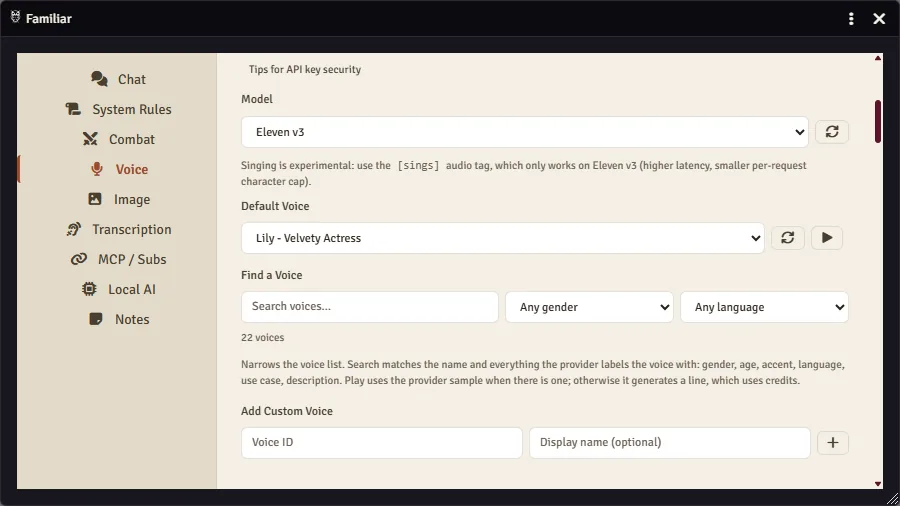
From Familiar's chat window in Foundry, open the voice settings.
Pick a provider and paste your API key. The key is per-user and stays in your browser.
Choose a voice, optionally pick a model, and hit Test to hear it. Tune it until the voice sounds right.
Set a second voice in the Character slot if you want narration and the cast to sound different. Leave it blank and every line uses your first voice.
Every provider here is bring-your-own-key and browser-direct. They trade cost against richness, so pick by how your night runs and what you want to spend. The figures below assume a typical session, around 15,000 characters of speech, and you pay the provider directly.
A simple split: ElevenLabs for a narration-heavy night, Cartesia when cost matters, OpenAI as the cheap default if you already hold an OpenAI key.
| Provider | Best for | Per session |
|---|---|---|
| ElevenLabs | Narration quality (recommended) | ~$4.50 |
| Cartesia | Cheapest and fastest | ~$0.20 |
| OpenAI | Cheap default, reuses your key | ~$0.30 |
BYOK: you pay the provider, not us, and costs scale with how much speech you generate. ElevenLabs Creator is a monthly plan (around $22 a month, with the per-session figure as overage on top); Cartesia and OpenAI bill purely per use.
Past the two slots, you can pin a voice to one character. Assign a voice to an NPC once and the AI uses it automatically every time that NPC speaks, so the harbourmaster sounds like the harbourmaster from one session to the next.
This is the audible half of writing a character down. A written anchor keeps an NPC consistent on the page; a pinned voice keeps them consistent in the ear. The companion guide on writing characters covers the anchor side.
Voice & Image GenerationAn optional emotion hint colours how a line is delivered. Tag it and the voice leans into the cue, from a whisper to a shout; leave it off and the line is read plainly.
Provider support differs. Cartesia and OpenAI take an emotion hint on any voice. ElevenLabs renders it only on the eleven_v3 model, the same model that unlocks singing, and skips it on the faster default.
Singing is the special case. Set the emotion to singing and the line is sung rather than spoken. It works on an ElevenLabs eleven_v3 voice only, so put that model on the voice you want to carry a song.
On ElevenLabs, switch the voice to the eleven_v3 model for emotion or singing; the faster default skips both. Cartesia and OpenAI take an emotion hint as it is.
By default the voice plays in one place: your browser, the GM's. Broadcast opens that up to the table. Off keeps every line local. Manual puts a broadcast button on the clip, so you choose which ones the room hears. Automatic plays each generated line for everyone as it lands, whether it came from the chat window in Foundry or from an assistant you drive over MCP.
A scene of dialogue reaches your players in order, each line held for as long as it really runs. Everyone keeps their own volume. Broadcast starts off and only the GM can change it, so nothing reaches the table until you say so. Leave it off for a local read-aloud, turn it on when you want the room to share the moment.
One thing trips people up after switching providers: a voice has to belong to the provider it is set on. An OpenAI voice name like alloy will not play on Cartesia, which identifies its voices by UUID rather than by name.
The dropdown is the fix. After you paste a provider key, choose a voice from the in-app list, which loads that provider's full library. Picking from the dropdown rather than carrying a name over from another provider keeps the voice and the provider matched.
A saved voice the provider no longer has stays in the list, marked unavailable, instead of quietly playing something else. That label is the fastest way to spot an id carried over from an older setup.
Voice is speech and singing. A few neighbouring things are deliberately out of scope, so you know where the edge is:
Pick a character who matters to your next session, set a provider and a voice, and let the AI speak the next time the party talks to them. You stay in the scene while it carries the lines. Questions about voices, providers, or your first session are welcome in the Discord.
Looking for session transcription instead, speaking your table aloud and saving a searchable record? That is a separate feature, with its own guide on the way.
Good AI D&D is good prep. Structure a published adventure, then hand the running to the AI.
Lay a published adventure into Foundry as journals, sheets, and a one-page outline, so the AI has the pages to run from.
Your vault is never copied into Foundry: the AI reads it where it is, through Obsidian's community plugin. What the setup takes, what a note looks like once the AI reads it, and how to fence off the folders it should not see.
Give an NPC who they are, what they know, what they want, and how they speak. Anchored to that, the AI voices them and fills the small edges itself.
A long campaign overflows any context window. Keep a searchable record in Foundry so the AI reads from your notes, not from a fading window.
Run combat with an AI that cannot cheat. Foundry's own dice enforce range, damage, and conditions, while you stay the DM.
Speak instead of type. Familiar transcribes the session in real time and saves it to a searchable Foundry journal you can edit later.
New to Familiar? I'm Ryan, the person who built it. The Discord is small and brand new, so if you join now I'll help you get set up myself.