
Guide
How to add AI to Foundry VTT.
You have run the game for everyone else long enough. Three steps put an AI on your side of the screen: install Familiar, activate your licence key, connect an AI. The short way in is a provider key pasted into Familiar's own chat. Or connect a Claude, ChatGPT, or SuperGrok plan over MCP, or a Google account for Gemini. It runs the adventure you imported, never one it invents.
What you need
Five things. The first is the Foundry game you already run; the rest are one install, one subscription, one adventure and one AI.
- Foundry VTT v13 or later, and a world you run as GM. Familiar is GM-side; your players install nothing.
- The Familiar module, installed and enabled. The click path is next.
- A Familiar subscription, first two weeks free. The key is in your customer portal, not the receipt: the Access purchase link in that email opens it, and so does familiarvtt.com/account. It starts with FAMILIAR- and switches the module on.
- A published adventure to import, so the AI has maps, NPCs and statblocks to run from. D&D 5e (2024) also gets the rules engine; on other Foundry systems everything else still runs, and your own system keeps the rules.
- An AI. Either a provider API key for the built-in chat, with nothing else to install, or a Claude, ChatGPT, or SuperGrok plan over MCP, or a Google account for Gemini. The MCP route also wants Node.js 20 or newer and the client app.
Install and activate Familiar
Familiar installs like any other module, and nothing here needs a terminal. This is the licence-key step; the provider key comes later.
Two Foundry modules share the name Familiar. Ours is the one by Ryan Jansen, the familiar-vtt package on npm. The other is an unrelated module last updated in 2024, and its documentation does not describe this one.
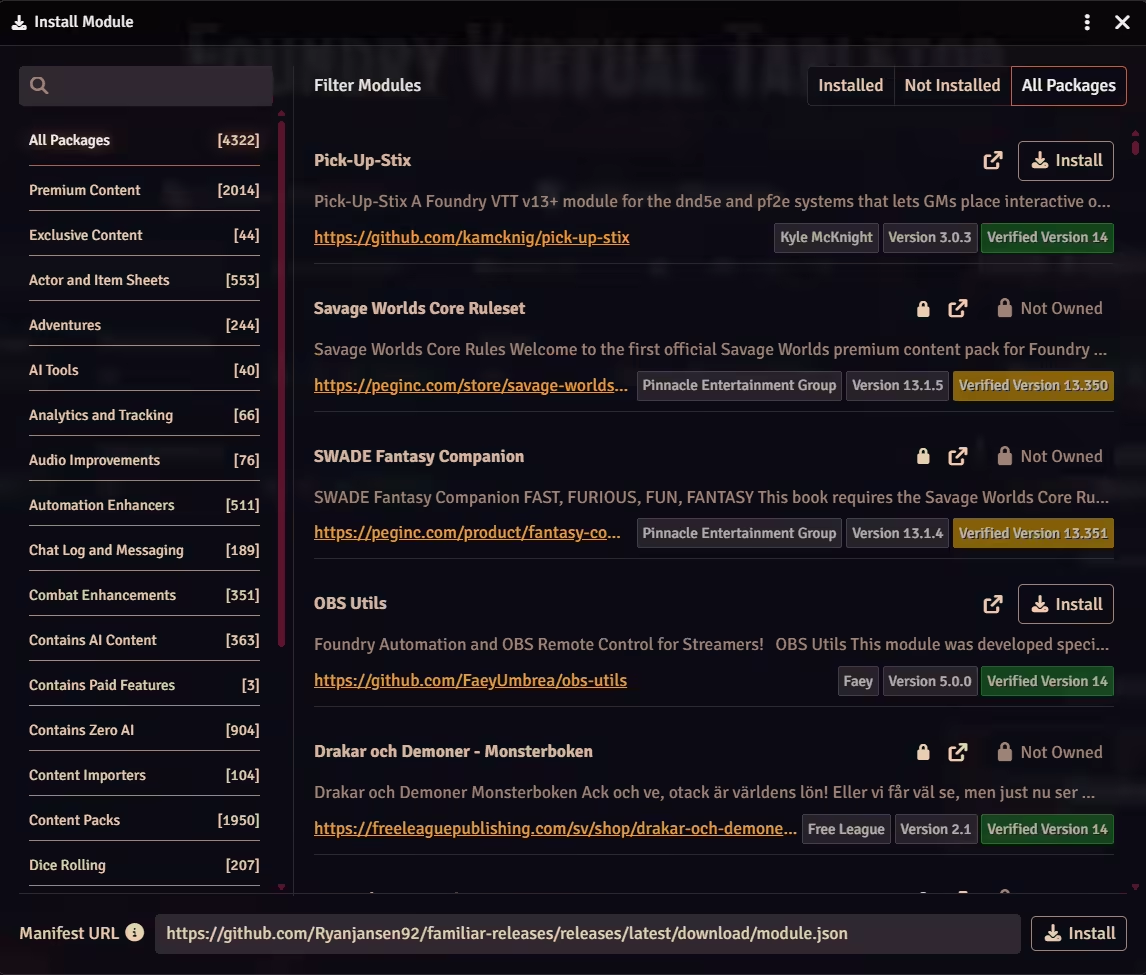
Install the module
In Foundry, open Add-on Modules, click Install Module, search Familiar and click Install. Or paste the manifest URL below into the same dialog.
Enable Familiar in your world
Tick it in the world you run, and save. The world reloads, and with no key stored the chat opens by itself on the activation card.
Paste your licence key and click Activate
The key goes on that card, never in Foundry's own settings sheet. The page reloads and the chat closes with it. The owl button bottom left, above the hotbar, brings it back, and so does Ctrl+Shift+Space.
https://github.com/Ryanjansen92/familiar-releases/releases/latest/download/module.json
Connect your AI: two doors
Familiar brings no model of its own and never proxies your tokens: you point it at an AI you control. So the last step is a fork.
The MCP door is the one for a chat subscription you already hold.
| What differs | Built-in chat (API key) | MCP (your plan) |
|---|---|---|
| How you connect | Paste a key on the Chat tab | Pick your client's card in the MCP / Subs wizard |
| Who bills the AI | Your provider, per token | The subscription you hold. Nothing extra on the AI bill, though it spends that plan's quota |
| What you install | Nothing beyond Foundry | Node.js 20 or newer, plus the client app |
| Only here | Live transcription, auto-pilot for NPC turns, and a model on your own machine | Long multi-step chains, and your own client's model and reasoning dial |
Both doors reach the same tools.
Door one: paste an API key
With the module activated, paste a provider key and the first reply lands in about a minute. Outside that minute sits the rest: the subscription, a provider key with billing on it, and an adventure imported before the AI has a campaign to run.
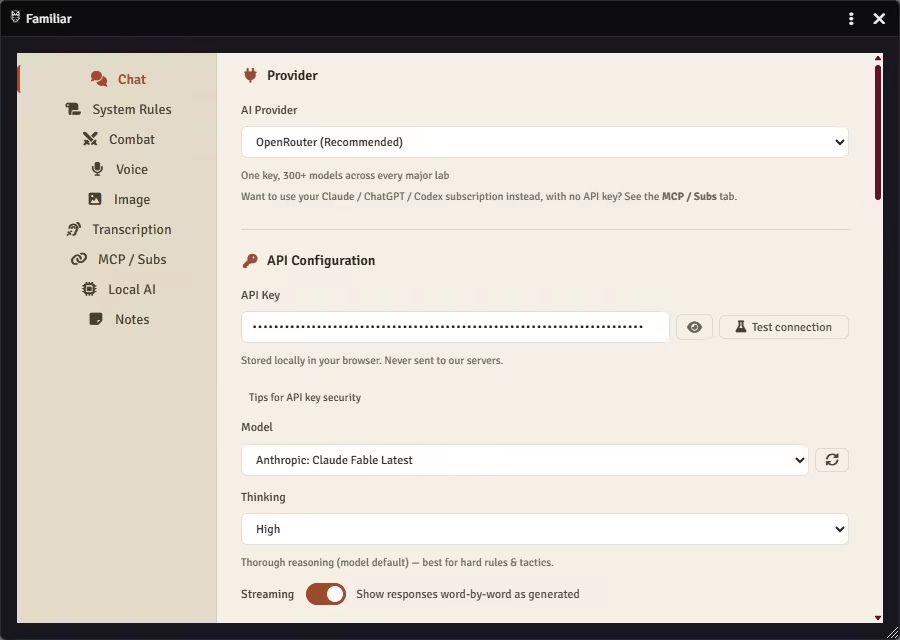
Demo clip coming
Open Familiar's settings
The owl button sits bottom left, above the hotbar. It opens the chat, whose Configure AI Provider button lands on the Chat tab. Or Module Settings, Familiar, Configure AI.
Pick a provider and paste the key
OpenRouter is already selected, and one key there reaches most models, so the model picks itself too. There is no Save button: the field saves as you type, and a small Saved flashes when it has. Keys stay in your browser and go straight to the provider.
Close the settings and say something
The chat opens on a row of suggestion chips: Roll initiative, Look up a monster, Search spells, My journals, Random scene. Clicking one sends it, or type your own line.
Door two: the plan you already pay for
Module Settings, Familiar, then the MCP / Subs tab. It carries a card per client, and picking yours writes out the exact text with this world's secret already in it: a config block, one command, or values for a form.
Three ways through it, easiest last. Follow the card yourself. Or copy its help prompt into any AI chat and let that walk you through it. Or, on the CLI cards, copy the setup prompt into the app itself and approve the steps it proposes.
This door adds one install, Node.js 20 or newer. The first start downloads Familiar's server, so give it a minute.

Demo clip coming
Check it answers from your world
How you know it worked depends on the door. In the built-in chat, the reply names your world back to you. Over MCP the wizard closes on its own verify line, and the status rows on that tab turn to Connected.
Each ask below leans on something your world already holds.
Combat & InitiativeJournals & NotesAudio & PlaylistsScenes & Tokens
- The first ask
Which world is this, and which scene is active?
- Over MCP, the wizard's line
Use Familiar's get-world-info tool
- Start a fight
Start combat with every token on this scene.
- Read your own notes
Search my journals for <NPC or place> and read me the entry.
- Set the mood
Play <playlist name> and darken the scene for night.
What it runs, and what stays yours
Familiar is a Foundry module that puts an AI on the DM's side of the table. You talk to it in plain language and it does the work a GM would otherwise do by hand: it rolls initiative, runs the monsters, looks up a rule, voices an NPC, keeps a record of the campaign.
Ask an AI to invent a campaign from nothing and it drifts. Give it a full published adventure and it runs the table on that, from a single scene to an entire campaign. The fewer humans at the table, the more it runs. It will not author the plot from nothing.
Someone hand-painted the map in that adventure and placed every wall and light on it; Familiar runs on that work rather than redrawing it. It keeps no secrets either: hidden information is Foundry's own fog of war, not an AI choosing what to withhold.
Familiar and Foundry's AI policy
Familiar is listed in the official Foundry package directory, declared as shipping zero AI-generated content. What it does make at your table, a portrait or a spoken line, stays there. Nothing it generates is packaged and sold.
More in Get started
New to Familiar? I'm Ryan, the person who built it. The Discord is small and brand new, so if you join now I'll help you get set up myself.